CD Linux command on steroids!
I have seen a similar implementation of a CD command for bash/linux that used a method to store a kind of DIR bookmarks and i...
 CP737! XQTRs bits and bytes...
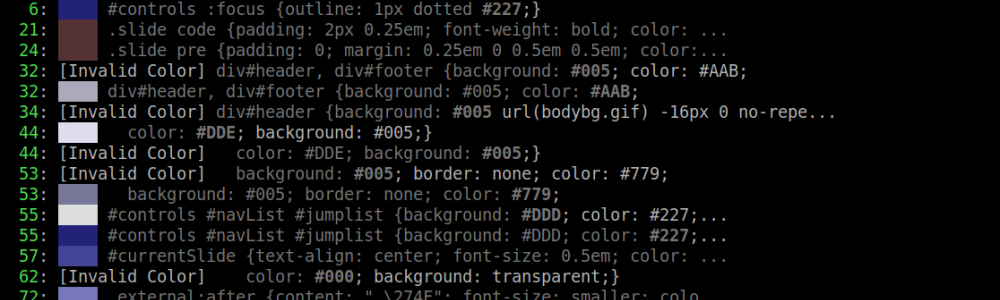
Many times you have to make your custom theme, for a program, theme, template etc. The easiest way, is to get the default one and change the color codes to your liking. But a theme file, may have hundred of color codes, which not all of them have to be edited, to match your preferences or the color codes are in an unreadable format, like RGB/RGBA values or there are too many values and not much time to edti them... and this is where clgrep comes.
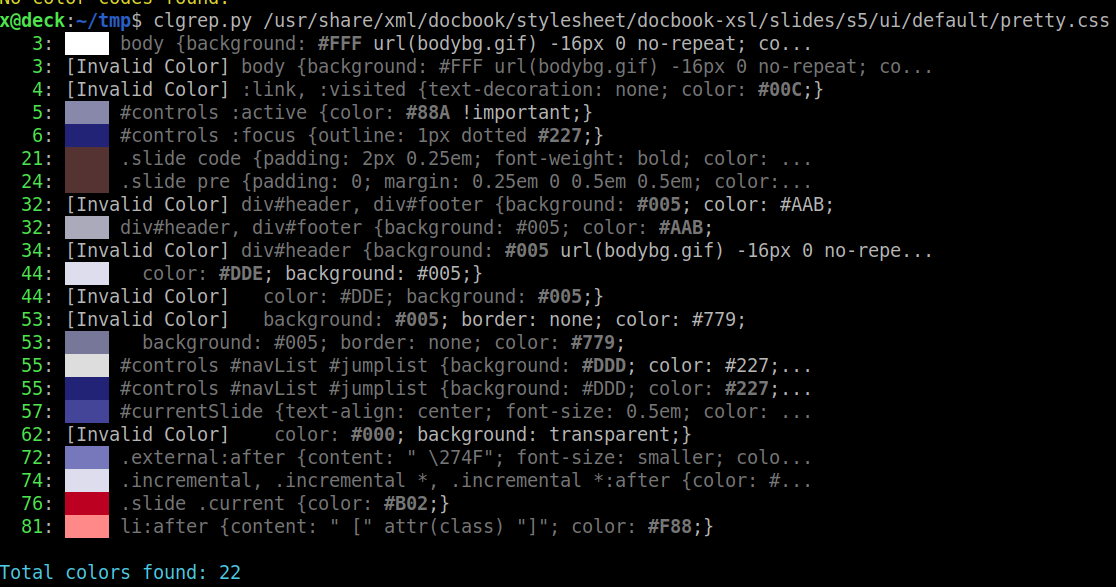
With clgrep you can see the color codes, visually in the terminal. The program will scan the file, find color codes in all the formats (hex values, dec values, rgb etc.) and display them to you, with a preview box to clearly see the color on the terminal. This way, you can quickly see, which values you have to change and which not, to make your own theme. The program also shows you the color value and the line number, to quickly trace it in the file/template, with an editor to change it.
It's written in Python3, so you can edit the program to, perhaps, add your own features or other color code matching values or change the way the results are displayed. It's open source, treat it as you like :)
#!/usr/bin/env python3
"""
Color Code Finder - A tool to find and display color codes in files or stdin
Supports HEX, RGB, and RGBA formats

Made by XQTR :: https://cp737.net :: telnet://andr01d.zapto.org:9999
"""

import re
import sys
import argparse
from pathlib import Path

# ANSI color codes for terminal output
class Colors:
    RESET = '\033[0m'
    BOLD = '\033[1m'
    RED = '\033[91m'
    GREEN = '\033[92m'
    YELLOW = '\033[93m'
    BLUE = '\033[94m'
    CYAN = '\033[96m'
    GRAY = '\033[90m'

def parse_hex_color(hex_code):
    """Convert hex color to RGB for terminal display"""
    hex_code = hex_code.lstrip('#')
    hex_code = hex_code.lstrip('0x')
    if len(hex_code) == 3:
        hex_code = ''.join([c*2 for c in hex_code])
    if len(hex_code) == 6:
        r, g, b = int(hex_code[0:2], 16), int(hex_code[2:4], 16), int(hex_code[4:6], 16)
        return (r, g, b)
    return None

def parse_rgb_color(rgb_string):
    """Parse RGB/RGBA string and return RGB values"""
    # Match rgb(100, 123, 33) or rgba(100, 23, 50, 0.2)
    match = re.search(r'rgba?\((\d+),\s*(\d+),\s*(\d+)(?:,\s*[\d.]+)?\)', rgb_string)
    if match:
        return (int(match.group(1)), int(match.group(2)), int(match.group(3)))
    return None

def create_color_block(rgb):
    """Create a colored block in terminal using ANSI escape codes"""
    if not rgb:
        return "[Invalid Color]"
    # Use ANSI 24-bit color for accurate representation
    return f"\033[48;2;{rgb[0]};{rgb[1]};{rgb[2]}m    \033[0m"

def find_color_codes_from_text(text, source_name="stdin"):
    """Find all color codes in the given text with their line numbers"""
    # Regex patterns for different color formats
    patterns = {
        'hex': r'#(?:[0-9a-fA-F]{3}|[0-9a-fA-F]{6})\b',
        'bin': r'0x(?:[0-9a-fA-F]{3}|[0-9a-fA-F]{6})\b',
        'rgb': r'rgb\(\s*\d+\s*,\s*\d+\s*,\s*\d+\s*\)',
        'rgba': r'rgba\(\s*\d+\s*,\s*\d+\s*,\s*\d+\s*,\s*[\d.]+\)'
    }

    combined_pattern = '|'.join(f'(?P<{key}>{pattern})' for key, pattern in patterns.items())
    color_regex = re.compile(combined_pattern)

    results = []
    lines = text.splitlines()

    for line_num, line in enumerate(lines, 1):
        matches = color_regex.finditer(line)
        for match in matches:
            color_code = match.group()
            # Determine color type and get RGB for display
            rgb = None
            color_type = 'unknown'

            if match.group('hex'):
                rgb = parse_hex_color(color_code)
                color_type = 'HEX'
            elif match.group('bin'):
                rgb = parse_hex_color(color_code)
                color_type = 'HEX'
            elif match.group('rgb') or match.group('rgba'):
                rgb = parse_rgb_color(color_code)
                color_type = 'RGB/A'

            results.append({
                'line_num': line_num,
                'line_content': line,
                'color_code': color_code,
                'color_type': color_type,
                'rgb': rgb,
                'source': source_name
            })

    return results

def find_color_codes_from_file(file_path):
    """Find all color codes in the file with their line numbers"""
    try:
        with open(file_path, 'r', encoding='utf-8') as file:
            content = file.read()
        return find_color_codes_from_text(content, source_name=str(file_path))
    except FileNotFoundError:
        print(f"{Colors.RED}Error: File '{file_path}' not found.{Colors.RESET}")
        sys.exit(1)
    except Exception as e:
        print(f"{Colors.RED}Error reading file: {e}{Colors.RESET}")
        sys.exit(1)

def display_results(results, show_line_content=True):
    """Display the found color codes with color blocks"""
    if not results:
        print(f"{Colors.YELLOW}No color codes found.{Colors.RESET}")
        return

    # Check if we have multiple sources
    sources = set(r['source'] for r in results)
    multiple_sources = len(sources) > 1

    for result in results:
        # Source info (if multiple)
        if multiple_sources:
            source_info = f"{Colors.CYAN}{result['source']}{Colors.RESET} "
        else:
            source_info = ""

        # Line number
        line_info = f"{Colors.GREEN}{result['line_num']:4d}{Colors.RESET}"

        # Color code with type
        color_info = f"{Colors.YELLOW}{result['color_code']}{Colors.RESET}"

        # Color block
        color_block = create_color_block(result['rgb'])

        # Line content (optional)
        if show_line_content and result['line_content']:
            # Truncate long lines
            line_preview = result['line_content'][:60]
            if len(result['line_content']) > 60:
                line_preview += "..."
            line_preview = line_preview.replace(result['color_code'], f"{Colors.BOLD}{result['color_code']}{Colors.RESET}")
            print(f"{source_info}{line_info}: {color_block} {Colors.GRAY}{line_preview}{Colors.RESET}")
        else:
            print(f"{source_info}{line_info}: {color_block} {color_info}")

    # Summary
    print(f"\n{Colors.CYAN}Total colors found: {len(results)}{Colors.RESET}")
    if multiple_sources:
        for source in sources:
            count = sum(1 for r in results if r['source'] == source)
            print(f"{Colors.GRAY}  {source}: {count} color(s){Colors.RESET}")
    print()

def main():
    parser = argparse.ArgumentParser(
        description='Find and display color codes (HEX, RGB, RGBA) in files or stdin',
    )
    parser.add_argument('file', nargs='?', help='Path to the file to analyze (optional if using stdin)')
    parser.add_argument('-l', '--no-line-content', action='store_true',
                       help='Do not show the line content (just line number and color)')
    parser.add_argument('-o', '--output', help='Save results to a file')

    args = parser.parse_args()

    # Read input
    if args.file:
        # Read from file
        file_path = Path(args.file)
        if not file_path.exists():
            print(f"{Colors.RED}Error: File '{args.file}' does not exist.{Colors.RESET}")
            sys.exit(1)
        results = find_color_codes_from_file(file_path)
    else:
        # Read from stdin
        if sys.stdin.isatty():
            # No input from pipe, show help
            parser.print_help()
            print(f"\n{Colors.YELLOW}No input provided. Pipe content to this script or specify a file.{Colors.RESET}")
            sys.exit(1)

        content = sys.stdin.read()
        if not content:
            print(f"{Colors.YELLOW}No input received from stdin.{Colors.RESET}")
            sys.exit(0)

        results = find_color_codes_from_text(content, source_name="<stdin>")

    # Display results
    display_results(results, show_line_content=not args.no_line_content)

    if args.output and results:
        try:
            with open(args.output, 'w', encoding='utf-8') as f:
                for result in results:
                    source_prefix = f"[{result['source']}] " if result['source'] != "<stdin>" else ""
                    f.write(f"{source_prefix}Line {result['line_num']}: {result['color_code']}\n")
            print(f"{Colors.GREEN}Results saved to {args.output}{Colors.RESET}")
        except Exception as e:
            print(f"{Colors.RED}Error saving to file: {e}{Colors.RESET}")

if __name__ == "__main__":
    main()
I have seen a similar implementation of a CD command for bash/linux that used a method to store a kind of DIR bookmarks and i...
Let see how we can use fzf for getting an input from the user... and i don't just mean to choose from a list of...

...or how to play games from a linux machine, from the terminal ;) Hackberry Pi, has a square screen, which makes it perfect for Gameboy...